APK載點(APK Download):https://bit.ly/45o3j9J
PC版載點(PC Download):https://bit.ly/3KOuWR7
TapTap載點(TapTap Download):https://bit.ly/3OGT7lH
儲值網站(Official Recharge Page):https://webpay.starforce.tw/?appId=2066001&lang=zh_TW
官方網站(Official Website):https://soc.starforce.tw/#/
官方粉絲團(Facebook Page):https://www.facebook.com/SwordofConvallariaTW
三種儲值方式(Recharge Methods):
官方粉絲團(Facebook Page):https://www.facebook.com/SwordofConvallariaTW
三種儲值方式(Recharge Methods):
I) 官網儲值(Official Recharge Page)
II) PC版儲值(PC Version Recharge)
III)APK儲值(APK Recharge)
備註:請使用VPN跨區申請全新台灣遊戲帳號,再使用MyCard-SOC專屬卡或其他MyCard選項作為支付方式。
Attention: Please register a NEW Taiwan Game ID using VPN before you can recharge SOC Online with MyCard-SOC exclusive card or other MyCard payment methods.
如何申請台灣遊戲帳號:
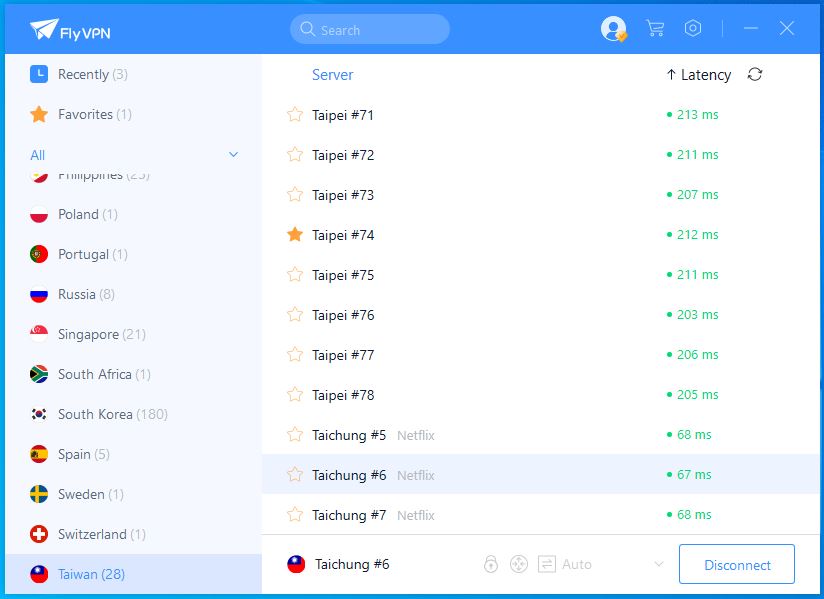
1. 首先開啓FlyVPN 點選台灣地區並連接.
Firstly, turn on FlyVPN, select Taiwan area and click on connect button.
Fly VPN儲值教學:https://bit.ly/3YKruww
How to reload FlyVPN with MyCard: https://bit.ly/3YKruww
Attention: Please register a NEW Taiwan Game ID using VPN before you can recharge SOC Online with MyCard-SOC exclusive card or other MyCard payment methods.
如何申請台灣遊戲帳號:
1. 首先開啓FlyVPN 點選台灣地區並連接.
Firstly, turn on FlyVPN, select Taiwan area and click on connect button.
Fly VPN儲值教學:https://bit.ly/3YKruww
How to reload FlyVPN with MyCard: https://bit.ly/3YKruww

2. 然後打開【鈴蘭之劍】並選擇想要使用的申請賬號方式即可.
2. Secondly, select the method you wish to register SOC Online.


3. 申請了台灣遊戲帳號後,玩家可關掉VPN,使用該遊戲帳號以正常方式登入《鈴蘭之劍》APK、PC版或儲值網頁即可。
3. After you have successfully registered a new Taiwan game ID, you may turn off your VPN and continue your SOC Online journey in PC or APK version with the Taiwan game ID, and recharge as usual.
3. After you have successfully registered a new Taiwan game ID, you may turn off your VPN and continue your SOC Online journey in PC or APK version with the Taiwan game ID, and recharge as usual.
I)官網儲值(Official Recharge Page)
1. 前往儲值網站:https://webpay.starforce.tw/?appId=2066001&lang=zh_TW
1. Visit official recharge page at: https://webpay.starforce.tw/?appId=2066001&lang=zh_TW

2. 輸入游戲角色ID, 點選游戲商品, 選擇MyCard作爲支付方式後, 點擊提交訂單.
2. Enter game ID, select item you wish to purchase, select MyCard as your payment method and click on [Submit] button.
1. Visit official recharge page at: https://webpay.starforce.tw/?appId=2066001&lang=zh_TW

2. Enter game ID, select item you wish to purchase, select MyCard as your payment method and click on [Submit] button.

3. Select [Global], and then select [MyCard Point Card].

4. Enter card number and password of MyCard-SOC exclusive card, click on [Top up] button. Done!

II) PC版儲值(PC Version Recharge)
1. 進入游戲後, 點擊【商店】.
1. Log in to PC version of SOC Online, click on [Shop].
1. Log in to PC version of SOC Online, click on [Shop].

2. Select [Recharge], item you wish to purchase and then click on [Purchase].


3. Confirm your order details, click on [Submit Order].

4. Select [Global], and then select [MyCard Point Card].

5. Enter card number and password of MyCard-SOC exclusive card, click on [Top up] button. Done!

III)APK儲值(APK Version Recharge)
1. 進入游戲後, 點擊【商店】.
1. Log in to APK version of SOC Online, click on [Shop].
1. Log in to APK version of SOC Online, click on [Shop].

2. Select [Recharge], item you wish to purchase and then click on [Purchase].


3. Confirm your order details, click on [Submit Order].

4. Select [Global], and then select [MyCard Point Card].

5. Enter card number and password of MyCard-SOC exclusive card, click on [Top up] button. Done!

粉絲頁:https://www.facebook.com/MyCardMalaysia
WhatsApp:https://bit.ly/MyCardCustomerService