MyCard Malaysia 官方网站

MyCard Malaysia 官方网站 http://www.mycard.com.my
MyCard Malaysia FB https://www.facebook.com/MyCardMalaysia
顯示具有 4399en 標籤的文章。 顯示所有文章

2020年8月19日 星期三

Goddess MUA MyCard 儲值教學

APK下載(APK Downlaod):
https://bit.ly/3iSSvrp
Android下載(Android Download):https://bit.ly/3l1Jgr4
iOS下載(iOS Download):https://apple.co/3kX0QMy
官方網站(Official Site):http://4399en.com/
粉絲頁(Facebook Page):https://www.facebook.com/GoddessMUA4399

Official site top up:
1. Visit the official page:http://4399en.com/
1. 进入官方网站:http://4399en.com/

2. Click 【recharge】
2. 点击<充值>

3. Key in your account and password and press【Log in】
3. 输入帐号与密码,然后点击<登入>

4. Select【MyCard】as your payment method,and then select game as【Goddess MUA】, server and role
4. 選擇<MyCard>作為儲值方式,然後選擇遊戲為<Goddess MUA>,伺服器和角色

5. Enter your MyCard Serial number and Password, then press the【Top Up】to complete.
5. 輸入對應MyCard卡號與MyCard密碼後,再點擊【Top Up】即可

Shall you having any issues regarding MyCard Top Up, reach us at our official Facebook page and leave us a message! Our customer service will reach back for you as soon as possible:https://www.facebook.com/MyCardMalaysia

若您在使用MyCard储值上有任何疑问,请前往MyCard Malaysia粉丝页私讯询问,客服人员会在工作时间内尽早回覆:https://www.facebook.com/MyCardMalaysia

2019年12月20日 星期五

Yong Heroes MyCard 儲值教學

Android下載(Android Download):http://bit.ly/2Q41Ujb
中文官方網站:http://4399en.com/
Official Site:http://4399en.com/
粉絲頁(Facebook Page):https://www.facebook.com/YongHeroes/


Official site top up:
1. Visit the official page:http://4399en.com/
1. 进入官方网站:http://4399en.com/

2. Click 【recharge】
2. 点击<充值>

3. Key in your account and password and press【Log in】
3. 输入帐号与密码,然后点击<登入>

4. Select【Malaysia】and press【Yong Heroes】
4. 國家選擇<馬來西亞>然后点击<Yong Heroes>

5. Fill up【Card Serial】, 【Card Pin】
5. 填<Card Serial>、<Card Pin>

6. Enter  【Top up】 to complete.
6. 点击<确认充值>即可


Shall you having any issues regarding MyCard Top Up, reach us at our official Facebook page and leave us a message! Our customer service will reach back for you as soon as possible:https://www.facebook.com/MyCardMalaysia

若您在使用MyCard储值上有任何疑问,请前往MyCard Malaysia粉丝页私讯询问,客服人员会在工作时间内尽早回覆:https://www.facebook.com/MyCardMalaysia

2018年12月31日 星期一

少年降妖传 MyCard储值教学


Android载点:http://bit.ly/2BNwV3V

1. 首先登入游戏平台官方网:http://4399en.com

2. 点击上方的【Recharge】

3. 登入您的帐号

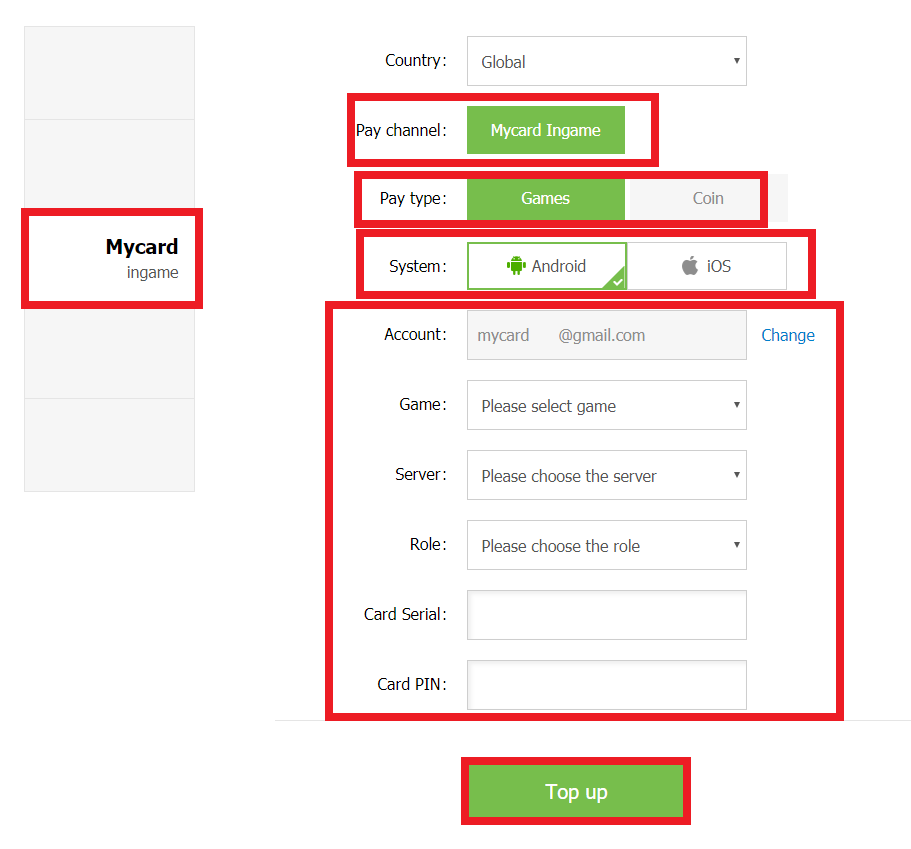
4. 首先选择左手旁的【MyCard】作为储值类型>储值方式选择【MyCard Ingame】>选择储值到【Games】内>选择您的【操作系统】>确认您的【账号】>储值游戏选择【少年降妖传】>选择【伺服器】>选择储值的【角色】>最后输入相应的MyCard卡号和密码, 然后点击【Top up】即可

若您在使用MyCard储值上有任何疑问,请前往MyCard Malaysia粉丝页私讯询问,客服人员会在工作时间内尽早回覆:https://www.facebook.com/MyCardMalaysia

2016年12月14日 星期三

Crasher MyCard Reload Guide


APK Download:http://bit.ly/2hrKSMt
Android Download:https://goo.gl/QEPqvp
iOS Download:http://apple.co/2hvcIoF

1. Visit the official page:http://crasher.4399en.com/

2. Click 【Recharge】

3. Login game account

4. Select 【MyCard】 > Select Country as【Malaysia】> Select【System】 > Select game【Crasher】 > Select【Server】 > Select【Role name】, Enter your MyCard Serial number and PIN, then press the green button 【Top up】 to complete.

Shall you having any issues regarding MyCard Top Up, reach us at our official Facebook page and leave us a message! Our customer service will reach back for you as soon as possible:https://www.facebook.com/MyCardMalaysia

2015年11月3日 星期二

League of Gods MyCard Topup Guide


Android Download:http://bit.ly/1XLq3YI
iOS Download:http://apple.co/1koqQ3d
APK Download:http://bit.ly/1Okt9Bi
Facebook page:https://www.facebook.com/leagueofgods.en/
Official site:http://league.4399en.com/

Currently there are two methods to top up using MyCard:
I) Official site top up
II) In-game top up

I) Official site top up:
1. Visit the official page:http://league.4399en.com/

2. Click 【Recharge】

3. Login game account

4. Select 【MyCard】 > Select【System】 > Select game【League of Gods】 > Select【Server】 > Select【Role name】,  Enter your MyCard Serial number and PIN, then press the green button 【Recharge】 to complete.

II) In-game top up:
1. Download the APK file of League of Gods and install it.

2. Login the game and select the 【Package】 button.

3. Press the gold.

4. Select Top-up

5. Select the items that you intended to buy.

6. Select【Other】

7. Select【MyCard】,Enter Serial number and PIN number. Click “TOP UP”.

Shall you having any issues regarding MyCard Top Up, reach us at our official Facebook page and leave us a message! Our customer service will reach back for you as soon as possible:https://www.facebook.com/MyCardMalaysia

2015年9月15日 星期二

Holy Knight MyCard TopUp Guide


Android Download:http://bit.ly/1URi9yV
iOS Download:http://apple.co/1VZvmTw
APK Download:http://bit.ly/1KnbLbZ
Facebook page:https://www.facebook.com/holyknight.en
Official site:http://hk.4399en.com/

Currently there are two methods to top up using MyCard:
I) Official site top up
II) In-game top up

I) Official site top up:
1. Visit the official page:http://hk.4399en.com/

2. Click 【Recharge】

3. Login game account

4. Select 【MyCard】 > Select【System】 > Select game【Holy Knight】 > Select【Server】 > Select【Role name】,  Enter your MyCard Serial number and PIN, then press the green button 【Recharge】 to complete.

II) In-game top up:
1. Download the APK file of Holy Knight and install it.

2. Login the game and select the button on the left.

3. Select the items that you intended to buy.


4. Select【MyCard】.

5. Enter Serial number and PIN number. Click “TOP UP”.

Shall you having any issues regarding MyCard Top Up, reach us at our official Facebook page and leave us a message! Our customer service will reach back for you as soon as possible: https://www.facebook.com/MyCardMalaysia

2015年7月14日 星期二

Thumb Empires MyCard TopUp Guide


APK Download:http://t.cn/RLz04W4
Official Site:http://empires.4399en.com

Steps to top up:
1. Login the game and select this button.

2. Select【Resource】 and click the gem icon to choose the top-up amount.

3. Select【MyCard】. Enter Serial number and PIN number. Click “TOP UP”.