MyCard Malaysia 官方网站

MyCard Malaysia 官方网站 http://www.mycard.com.my
MyCard Malaysia FB https://www.facebook.com/MyCardMalaysia
顯示具有 會員扣點 標籤的文章。 顯示所有文章

2024年4月8日 星期一

Twinkle MyCard Recharge Guidelines (Twinkle MyCard儲值教學)

Android Download (Android載點):https://rebrand.ly/359yitv
iOS Download (iOS載點):https://rebrand.ly/zuzpikr
Official Recharge Website (儲值官網):https://twinkles.app/key/recharge
Official Website (官方網站):https://twinkles.app/

I. Official Recharge Website (官網儲值)
II. In Game Recharge (游戲内儲值)

I. Official Recharge Website (官網儲值)
1. Go to official recharge website: https://twinkles.app/key/recharge,key in 【ID】.
1. 前往儲值官網:https://twinkles.app/key/recharge,輸入【ID】登入.
Recommendation: Use a mobile phone to go to the official recharge website.
建議: 使用手機進入儲值官網.


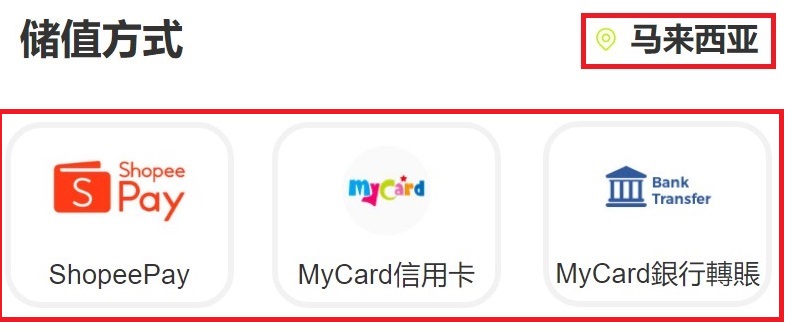
2. For Malaysian players,you may select【Malaysia】region, and choose the 【payment method】 you prefer,then select the 【amount】you intend to buy.
2. 馬來西亞用戶,地區選擇【馬來西亞】,及選擇您的【儲值方式】,然後選擇欲購買的【金額】進行儲值.


3. For Malaysian and Singaporean players recharge by using【MyCard Point Card】, select【Taiwan】and【MyCard Point Card】,then enter the card number (Serial Number) and password, click【Top Up】to complete the recharge.
3. 新馬用戶使用【MyCard點數卡】儲值, 選擇【台灣】和【MyCard點數卡】並輸入對應的MyCard卡號(Serial number)與密碼(Password),再點擊【進行儲值】即可. 
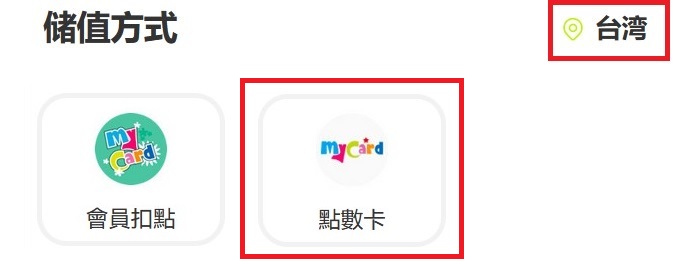


4. For Malaysian and Singaporean players recharge by using【MyCard Point Deduction】, select【Taiwan】and【MyCard Point Deduction】,then log in your account to complete the payment.
4. 新馬用戶使用【MyCard會員】儲值, 選擇【台灣】和【MyCard會員】並登入您的賬號完成付款即可.


II. In Game Recharge (游戲内儲值)
1. Download and install the APP on play store / app store.
1. 在play store / app store下載APP並安裝.
 
2. Select【key🔑】,then click【Official recharge】at the【My Wallet】.
2. 選擇【鑰匙🔑】,然後在【我的錢包】頁面點擊【官方充值】.


3. Key in 【ID】,for Malaysian players,you may select【Malaysia】region, and choose the 【payment method】 you prefer.
3. 輸入【ID】登入,馬來西亞用戶,地區選擇【馬來西亞】,及選擇您的【儲值方式】.


4. Then select the【amount】you intend to buy .
4. 然後選擇欲購買的【金額】進行儲值.


5. For Malaysian and Singaporean players recharge by using【MyCard Point Card】, select【Taiwan】and【MyCard Point Card】,then enter the card number (Serial Number) and password, click【Top Up】to complete the recharge.
5. 新馬用戶使用【MyCard點數卡】儲值, 選擇【台灣】和【MyCard點數卡】並輸入對應的MyCard卡號(Serial number)與密碼(Password),再點擊【進行儲值】即可. 


6. For Malaysian and Singaporean players recharge by using【MyCard Point Deduction】, select【Taiwan】and【MyCard Point Deduction】,then log in your account to complete the payment.
6. 新馬用戶使用【MyCard會員】儲值, 選擇【台灣】和【MyCard會員】並登入您的賬號完成付款即可.


Shall you having any issues regarding MyCard Top Up, reach us at our official Facebook page or WhatsApp and leave us a message! Our customer service will reach back for you as soon as possible.
FB Page:https://www.facebook.com/MyCardMalaysia
WhatsApp:https://bit.ly/MyCardCustomerService

若您在使用MyCard儲值上有任何疑問,請前往MyCard Malaysia粉絲頁或者Whatsapp詢問,客服人員會在工作時間內儘早回覆。
粉絲頁:https://www.facebook.com/MyCardMalaysia
WhatsApp:https://bit.ly/MyCardCustomerService

2023年10月27日 星期五

咻咻三國 MyCard儲值教學

Android載點:https://bit.ly/407250N

遊戲內儲值 (APK版)
1. 官網下載APK並安裝游戲.

2. 進入游戲後, 點擊【商城】.


3. 選擇欲儲值的金額.


4. 馬來西亞用戶,地區選擇【馬來西亞】及選擇您的付款方式.


5. 新加坡用戶,地區選擇【新加坡】及選擇您的付款方式.


6. 新馬用戶選擇【MyCard點數卡】儲值,輸入卡號及密碼即完成付款.


7. 新馬用戶選擇【MyCard會員扣點】儲值,登入帳號即完成付款.


若您在使用MyCard儲值上有任何疑問,請前往MyCard Malaysia粉絲頁或者Whatsapp詢問,客服人員會在工作時間內儘早回覆。
粉絲頁:https://www.facebook.com/MyCardMalaysia
WhatsApp:https://bit.ly/MyCardCustomerService

Battle Through the Heavens MyCard Recharge Guidelines (鬥破蒼穹:怒火雲嵐 MyCard儲值教學)

Android Download(Android載點):https://bit.ly/408UkaL
iOS Download (iOS載點):https://apple.co/46J9Bl7
Recharge Website (儲值網站):https://mycard.markeets.com/topup
Official Website (官方網站):https://dptw.btthgame.com/
Facebook Page (官方粉絲團):https://bit.ly/49kpf8e

Official Recharge Website(官網儲值):
1. Go to recharge website: https://mycard.markeets.com/topup
1. 前往儲值網站:https://mycard.markeets.com/topup

2. Game select【Battle Through the Heavens】, enter your【ID】and click【Confirm】, then payment method select【MyCard】.
2. 游戲選擇【斗破苍穹:怒火云岚】, 輸入【ID】和點擊【確認】, 接著儲值方式選擇【MyCard】.

3. Select which【Gold Dollar】that you intend to buy, then click【To-store value】.
3. 選擇您欲購買的【金元】, 然後點擊【前往儲值】.

4. For Malaysian players, you may select【Malaysia】region, and choose the payment method you prefer.
4. 馬來西亞用戶,地區選擇【馬來西亞】,及選擇您的付款方式.


5. For Singaporean players, you may select【Singapore】region, and choose the payment method you prefer.
5. 新加坡用戶,地區選擇【新加坡】,及選擇您的付款方式.


6. For Malaysian and Singaporean players recharge by using【MyCard Point Card】, enter the card number (Serial Number) and password, then click【Top Up】to complete.
6. 新馬地區用戶使用【MyCard點數卡】儲值, 並輸入對應的MyCard卡號(Serial number)與密碼(Password),再點擊【進行儲值】即可.


7. For Malaysian and Singaporean players recharge by using【MyCard Point Deduction】, login your account to complete payment.
7. 新馬地區用戶使用【MyCard會員】儲值, 登入您的賬號完成付款即可.


Shall you having any issues regarding MyCard Top Up, reach us at our official Facebook page or WhatsApp and leave us a message! Our customer service will reach back for you as soon as possible.
FB Page:https://www.facebook.com/MyCardMalaysia
WhatsApp:https://bit.ly/MyCardCustomerService

若您在使用MyCard儲值上有任何疑問,請前往MyCard Malaysia粉絲頁或者Whatsapp詢問,客服人員會在工作時間內儘早回覆。
粉絲頁:https://www.facebook.com/MyCardMalaysia
WhatsApp:https://bit.ly/MyCardCustomerService

2023年10月26日 星期四

City of Crime: Gang Wars MyCard Recharge Guidelines (罪惡之城 MyCard儲值教學)

Android Download(Android載點):https://bit.ly/3tTu1sN
iOS Download (iOS載點):https://apple.co/49aIlxu
Recharge Website (儲值網站):https://bit.ly/3Qf0Sjx
官方粉絲團:https://www.facebook.com/CityofCrimeAsia

Official Recharge Website(官網儲值):
1. Go to recharge website: https://bit.ly/3Qf0Sjx
1. 前往儲值網站:https://bit.ly/3Qf0Sjx

2. Enter【UID】, payment method select【MyCard】and【MyCard - 付費墻 - 港澳】.
2. 輸入【UID】, 支付方式選擇【MyCard】和【MyCard - 付費墻 - 港澳】.

3. Select which【C Coins】that you intend to buy, then click【Confirm】.
3. 選擇您欲購買的【C Coins】, 然後點擊【確認儲值】.

4. Check the purchase information, then click【OK】
4. 檢查儲值資訊, 接著點擊【確認】

5. For Malaysian players, you may select【Malaysia】region, and choose the payment method you prefer.

5. 馬來西亞用戶,地區選擇【馬來西亞】,及選擇您的付款方式.


6. For Singaporean players, you may select【Singapore】region, and choose the payment method you prefer.
6. 新加坡用戶,地區選擇【新加坡】,及選擇您的付款方式.


7. For Malaysian and Singaporean players recharge by using【MyCard Point Card】, enter the card number (Serial Number) and password, then click【Top Up】to complete.
7. 新馬地區用戶使用【MyCard點數卡】儲值, 並輸入對應的MyCard卡號(Serial number)與密碼(Password),再點擊【進行儲值】即可.


8. For Malaysian and Singaporean players recharge by using【MyCard Point Deduction】, payment method select【MyCard 付費牆】, then turn back to step 3 and step 4.
8. 新馬地區用戶使用【MyCard會員】儲值, 支付方式選擇【MyCard 付費牆】, 接著回到步驟3和步驟4.

9. Select【MyCard Wallet】and login your account to complete payment.
9. 選擇【MyCard會員扣點】及登入您的賬號完成付款即可.


Shall you having any issues regarding MyCard Top Up, reach us at our official Facebook page or WhatsApp and leave us a message! Our customer service will reach back for you as soon as possible.
FB Page:https://www.facebook.com/MyCardMalaysia
WhatsApp:https://bit.ly/MyCardCustomerService

若您在使用MyCard儲值上有任何疑問,請前往MyCard Malaysia粉絲頁或者Whatsapp詢問,客服人員會在工作時間內儘早回覆。
粉絲頁:https://www.facebook.com/MyCardMalaysia
WhatsApp:https://bit.ly/MyCardCustomerService
