MyCard Malaysia 官方网站

MyCard Malaysia 官方网站 http://www.mycard.com.my
MyCard Malaysia FB https://www.facebook.com/MyCardMalaysia
顯示具有 购买 標籤的文章。 顯示所有文章

2024年2月20日 星期二

粉絲頁購買MyCard教學(How to purchase MyCard on MyCard Facebook)

1. Visit the MyCard official Facebook: https://www.facebook.com/MyCardMalaysia
1. 前往MyCard官方粉絲頁:https://www.facebook.com/MyCardMalaysia

2. Press【Book Now】
2. 點擊【立即預約】


3. Tick the product that you intend to buy and press【Next】
3. 選擇您想購買的產品後點擊【繼續】


4. Select【Date, Time】and press【Next】
4. 選擇【日期與時間】後點擊【繼續】

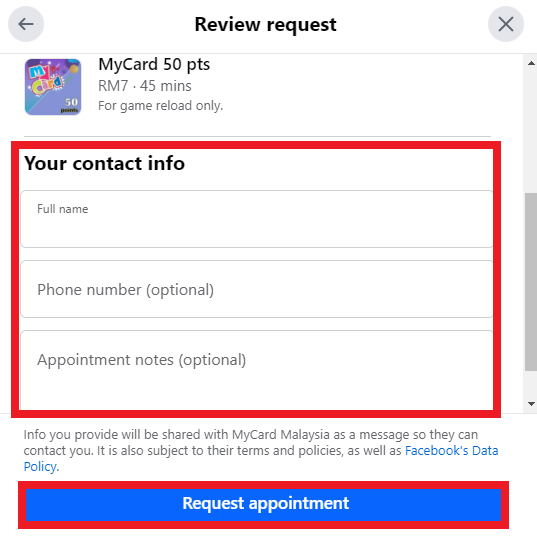
5. Fill in【Contact Info】and press【Request appointment】to sent us your order
5. 輸入【姓名、手機號碼、以及需要的備註】點擊【請求預約】發送您的訂單


6. Press【Done】
6. 點擊【完成】

2022年3月22日 星期二

Senheng App购买MyCard教学(How to purchase MyCard from Senheng App App)


Android Download(载点):https://bit.ly/3wrigt6
iOS Download(载点):https://apple.co/3ugprBI

1. Login and press【Home】, then select【More】
1. 登入帐号后点击左下方的【Home】,然后点击【More】

2. Press【GAME】
2. 点击【GAME】

3. Select【MyCard】
3. 点击【MyCard】

4. Choose the【MyCard Point】that you intended to buy then press【Pay】
4. 选择欲购买的点数(您欲购买的价钱)然后点击【Pay】

5. Select【Payment Method】to complete payment.
5. 选择【Payment Method】来完成购买.

Shall you having any issues regarding MyCard Top Up, reach us at our official Facebook page and leave us a message! Our customer service will reach back for you as soon as possible:https://www.facebook.com/MyCardMalaysia

若您在使用MyCard储值上有任何疑问,请前往MyCard Malaysia粉丝页私讯询问,客服人员会在工作时间内尽早回覆:https://www.facebook.com/MyCardMalaysia

2022年3月1日 星期二

Touch 'n Go eWallet购买MyCard教学(How to purchase MyCard from Touch 'n Go eWallet)


Android Download(载点):https://bit.ly/3ti3otF
iOS Download(载点):https://apple.co/3ti9H0u

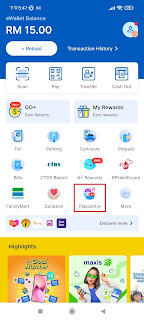
1. Login and press【Playcentre】
1. 登入帐号后点击【Playcentre】

If you can't find【Playcentre】, then press【more】and scroll down to look for【Entertainment】
如果你找不到【Playcentre】,那请点击【more】然后拉下来寻找【Entertainment】

2. Press【MyCard】
2. 点击【MyCard】

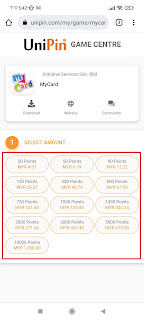
3. Choose the【MyCard Point】that you intended to buy
3. 选择欲购买的点数(您欲购买的价钱)

4. Enter email and phone number, then press【Confirm】
4. 输入Email与手机号码,然后点击【Confirm】

5. Press【Pay】
5. 点击【Pay】

6. Key in your Touch n GO【PIN】
6. 输入Touch n GO【PIN】

7. Complete.
7. 完成购买.

Shall you having any issues regarding MyCard Top Up, reach us at our official Facebook page and leave us a message! Our customer service will reach back for you as soon as possible:https://www.facebook.com/MyCardMalaysia

若您在使用MyCard储值上有任何疑问,请前往MyCard Malaysia粉丝页私讯询问,客服人员会在工作时间内尽早回覆:https://www.facebook.com/MyCardMalaysia

2020年11月10日 星期二

Public Bank购买MyCard教学(How to purchase MyCard from Public Bank)


1. Visit the official page:https://www.pbebank.com/
1. 进入官方网站:https://www.pbebank.com/

2. Press【Login】and Choose【PBe】
2. 点击【Login】后选择【PBe】

3. Login your【Account】
3. 登入<账号>

4. After login, click【Payment】, Select【Prepaid】
4. 登入账户后,点击<Payment>,选择<Prepaid>


5. Select【Top-up】as your Category, Select【MyCard】as your Prepaid Type then press【Next】, 
5. 选择<Top-up>,然后选择<MyCard>为要购买的品项后点击<Next>


6. Select your account, then key in your【Handphone No】and choose the【Amount】that you intended to buy, then press【Accept】
6. 选择您的户口,然后输入您的<手机号码>,接着选择欲购买的<点数>后点击<Accept>

7. Press【Confirm】, then approve and verify this transaction with【PB SecureSign】to complete.
7. 点击<Confirm>,然后透过<PB SecureSign>同意和验证这个交易并完成购买. 

Shall you having any issues regarding MyCard Top Up, reach us at our official Facebook page and leave us a message! Our customer service will reach back for you as soon as possible:https://www.facebook.com/MyCardMalaysia

若您在使用MyCard储值上有任何疑问,请前往MyCard Malaysia粉丝页私讯询问,客服人员会在工作时间内尽早回覆:https://www.facebook.com/MyCardMalaysia

2020年3月24日 星期二

Express Kiosk購買MyCard教學(How to purchase MyCard from Express Kiosk)


1. Select language
1. 選擇語言

2. Press【More Services】
2. 點擊<更多服務>

3. Select【MyCard】
3. 選擇<MyCard>

4. Choose the【MyCard Point】that you intended to buy
4. 選擇欲購買的<MyCard點數>

5. Key in your【Mobile Number】to receive the【MyCard Serial Number】&【Password】
5. 輸入您的<手機號碼>以便接收<MyCard序號與密碼>

6. Check your【Payment Details】and press【Confirm】
6. 確認<付款資料>後點擊<確定>

7. Insert your cash, and press【Confirm】
7. 放入現金後點擊<確定>
 

8. Wait awhile it show whether the payment is successful. If the payment is successful, it will ask for【Print Receipt】or【No Need】
8. 稍微等候以顯示交易是否成功,成功的話會出現提示詢問是否需要<打印收據>或<不用>
 

9. A few minutes after completing the payment, your phone will receive the MyCard Serial and Password
9. 完成交易的數分鐘後手機將會收到MyCard的序號以及密碼