MyCard Malaysia 官方网站

MyCard Malaysia 官方网站 http://www.mycard.com.my
MyCard Malaysia FB https://www.facebook.com/MyCardMalaysia
顯示具有 FPX 標籤的文章。 顯示所有文章

2020年4月15日 星期三

失落的龍珠MyCard儲值教學

APK載點:http://bit.ly/2UAwuFb
官方網站:https://bit.ly/2Kigstf

儲值步驟:
1. 下載並安裝APK包,登入遊戲後點擊右上角的【龍石】

2. 點擊【龍石】後會進入VIP特權,再點擊【儲值】

3. 選擇欲充值的【龍石】

4. 選擇【MyCard】為支付方式

5. 選擇【MyCard會員扣點】

6. 登入MyCard會員即可完成儲值

7. MyCard會員賬號點數不足,可以用FPX儲值
9. 登入<会员账号>

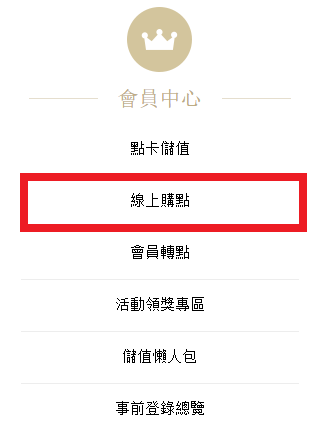
10. 登入账户后,点击<线上购点>
11. 选择<TWD>作为货币,选择欲储值的<MyCard会员点数>,然后选择<马来西亚地区支付>,选择<FPX>作为支付方式后点击<下一步>
12. 确认储值资料后点击<进行储值>
13. 填写真实姓名,电子邮件,手机门号选择<马来西亚>再填写手机号码,然后选择欲使用的银行后点击<Proceed>
注:务必填写姓名以及电话号码

14. 检查您的交易资料后点击<确认送出>
15. 登入银行账户完成购买流程

若您在使用MyCard儲值上有任何疑問,請前往MyCard Malaysia粉絲頁私訊詢問,客服人員會在工作時間內盡早回覆:https://www.facebook.com/MyCardMalaysia

2020年3月18日 星期三

MyCard会员购买点数教学(How to purchase MyCard point for member account by multi payment method )


1. Visit the official page:https://member.mycard520.com.tw/global/en-us

2. Login your【Account】
2. 登入<会员账号>


3. After login, click【Buy Online】
3. 登入账户后,点击<线上购点>


4. Select【TWD】as your Currency, Choose the【MyCard Point】that you intended to buy, Select【Malaysia Area Payment】, and Select your payment method, in the end press【Confirm】
4. 选择<TWD>作为货币,选择欲储值的<MyCard会员点数>,然后选择<马来西亚地区支付>,选择<支付方式>后点击<下一步>


5. Check account information and press【Confirm】
5. 确认帐号无误后点击<Confirm>

There are many different【payment methods】to reload MyCard member account
MyCard会员储值拥有多种不同的<支付方式>

Boost
1. Key in your name, Email adress, select【Malaysia】and fill in your mobile number and press【Proceed】
1. 填写真实姓名,电子邮件,手机号码选择<马来西亚>再填写手机号码,然后点击<Proceed>
Note: Be sure to fill in your name, phone number, and email
注:务必填写姓名、电话号码、以及电子邮件

2. Check your transaction detail and press【Send Confirm】
2. 检查您的交易资料后点击<Send Confirm>


3. Press【Process】
3. 点击<Process>

4. Open your Boost App and scan the QR code complete the payment.
4. 打开您的Boost应用程序后扫描QR码完成付费

Grab
1. Key in your name, Email adress, select【Malaysia】and fill in your mobile number and press【Proceed】
1. 填写真实姓名,电子邮件,手机号码选择<马来西亚>再填写手机号码,然后点击<Proceed>
Note: Be sure to fill in your name, phone number, and email
注:务必填写姓名、电话号码、以及电子邮件

2. Check your transaction detail and press【Send Confirm】
2. 检查您的交易资料后点击<Send Confirm>


3. Press【Process】
3. 点击<Process>

4. Login your Grab account complete the payment.
4. 登入您的Grab帐号已完成付费

MAE by Maybank
1. Key in your name, Email adress, select【Malaysia】and fill in your mobile number and press【Proceed】
1. 填写真实姓名,电子邮件,确认手机号码,然后点击<Proceed>
Note: Be sure to fill in your name, phone number, and email
注:务必填写姓名、电话号码、以及电子邮件

2. Check your transaction detail and press【Send Confirm】
2. 检查您的交易资料后点击<Send Confirm>

3. Open your MAE App and scan the QR code complete the payment.
3. 打开您的MAE应用程序后扫描QR码完成付费

ShopeePay
1. Key in your name, Email adress, select【Malaysia】and fill in your mobile number and press【Proceed】
1. 填写真实姓名,电子邮件,确认手机号码,然后点击<Proceed>
Note: Be sure to fill in your name, phone number, and email
注:务必填写姓名、电话号码、以及电子邮件

2. Check your transaction detail and press【Send Confirm】
2. 检查您的交易资料后点击<Send Confirm>


3. Open your Shopee App and scan the QR code complete the payment.
3. 打开您的Shopee应用程序后扫描QR码完成付费

Touch 'n Go eWallet
1. Key in your name, Email adress, select【Malaysia】and fill in your mobile number and press【Proceed】
1. 填写真实姓名,电子邮件,确认手机号码,然后点击<Proceed>
Note: Be sure to fill in your name, phone number, and email
注:务必填写姓名、电话号码、以及电子邮件

2. Check your transaction detail and press【Send Confirm】
2. 检查您的交易资料后点击<Send Confirm>

3. Press【Process】
3. 点击<Process>

4. Open your TNG eWallet App and scan the QR code complete the payment.
4. 打开您的TNG eWallet应用程序后扫描QR码完成付费

FPX
1. Key in your name, Email adress, select【Malaysia】and fill in your mobile number, select the【Bank】that you intended to use and press【Proceed】
1. 填写真实姓名,电子邮件,确认手机号码,然后选择欲使用的银行后点击<Proceed>
Note: Be sure to fill in your name, phone number, and email
注:务必填写姓名、电话号码、以及电子邮件


2. Check your transaction detail and press【Send Confirm】
2. 检查您的交易资料后点击<Send Confirm>


3. Login your bank account to complete the payment.
3. 登入银行账户完成购买流程