MyCard Malaysia 官方网站

MyCard Malaysia 官方网站 http://www.mycard.com.my
MyCard Malaysia FB https://www.facebook.com/MyCardMalaysia
顯示具有 purchase MyCard point 標籤的文章。 顯示所有文章

2022年3月22日 星期二

Senheng App购买MyCard教学(How to purchase MyCard from Senheng App App)


Android Download(载点):https://bit.ly/3wrigt6
iOS Download(载点):https://apple.co/3ugprBI

1. Login and press【Home】, then select【More】
1. 登入帐号后点击左下方的【Home】,然后点击【More】

2. Press【GAME】
2. 点击【GAME】

3. Select【MyCard】
3. 点击【MyCard】

4. Choose the【MyCard Point】that you intended to buy then press【Pay】
4. 选择欲购买的点数(您欲购买的价钱)然后点击【Pay】

5. Select【Payment Method】to complete payment.
5. 选择【Payment Method】来完成购买.

Shall you having any issues regarding MyCard Top Up, reach us at our official Facebook page and leave us a message! Our customer service will reach back for you as soon as possible:https://www.facebook.com/MyCardMalaysia

若您在使用MyCard储值上有任何疑问,请前往MyCard Malaysia粉丝页私讯询问,客服人员会在工作时间内尽早回覆:https://www.facebook.com/MyCardMalaysia

2022年3月1日 星期二

Touch 'n Go eWallet购买MyCard教学(How to purchase MyCard from Touch 'n Go eWallet)


Android Download(载点):https://bit.ly/3ti3otF
iOS Download(载点):https://apple.co/3ti9H0u

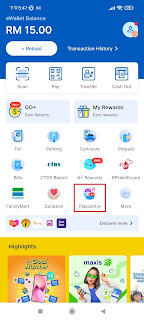
1. Login and press【Playcentre】
1. 登入帐号后点击【Playcentre】

If you can't find【Playcentre】, then press【more】and scroll down to look for【Entertainment】
如果你找不到【Playcentre】,那请点击【more】然后拉下来寻找【Entertainment】

2. Press【MyCard】
2. 点击【MyCard】

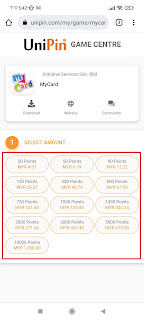
3. Choose the【MyCard Point】that you intended to buy
3. 选择欲购买的点数(您欲购买的价钱)

4. Enter email and phone number, then press【Confirm】
4. 输入Email与手机号码,然后点击【Confirm】

5. Press【Pay】
5. 点击【Pay】

6. Key in your Touch n GO【PIN】
6. 输入Touch n GO【PIN】

7. Complete.
7. 完成购买.

Shall you having any issues regarding MyCard Top Up, reach us at our official Facebook page and leave us a message! Our customer service will reach back for you as soon as possible:https://www.facebook.com/MyCardMalaysia

若您在使用MyCard储值上有任何疑问,请前往MyCard Malaysia粉丝页私讯询问,客服人员会在工作时间内尽早回覆:https://www.facebook.com/MyCardMalaysia

2020年12月29日 星期二

MyCard購買方式(Where To Buy MyCard)

<MyCard會員點數購買/MyCard Member Top-up>
溫馨提醒: MyCard點數卡目前無法用於儲值MyCard會員, 請用FPX, Touch n Go, Grab Pay, Boost, MCash, Nets QR以及Shopee Pay儲值MyCard會員.

MyCard會員購買點數教學(大馬): https://bit.ly/3lR7EL9
MyCard會員購買點數教學(新加坡): https://bit.ly/2IlmfAF

<MyCard點數卡購買/MyCard Point Top-up>
溫馨提醒: MyCard點數可用於直儲遊戲, 請向以下銷售商購買MyCard點數卡.

[Malaysia]

e-Play銷售點:http://bit.ly/mycardloc

Online:
OffGamers (www.offgamers.com)
On9Gamer (www.on9gamer.com)
SEAGamer (www.seagm.com)
Cdkey Plus (www.cdkeyplus.com)

e-Banking Website:
Hong Leong Bank (http://bit.ly/mycardhlb)
Alliance Bank (http://bit.ly/mycardabmb)

Mobile App:

Kiosk
DIGI Express Kiosk (https://bit.ly/DIGIExKiosk)

****

[Singapore]


****

[Thailand]

CGC Thailand (www.cgcth.com)
OffGamers (www.offgamers.com)
On9Gamer (www.on9gamer.com)
SEAGamer (www.seagm.com)

****

[Philippine]

OffGamers (www.offgamers.com)
On9Gamer (www.on9gamer.com)
SEAGamer (www.seagm.com)

****

[Indonesia]

OffGamers (www.offgamers.com)
On9Gamer (www.on9gamer.com)
SEAGamer (www.seagm.com)

2020年3月18日 星期三

MyCard会员购买点数教学(How to purchase MyCard point for member account by multi payment method )


1. Visit the official page:https://member.mycard520.com.tw/global/en-us

2. Login your【Account】
2. 登入<会员账号>


3. After login, click【Buy Online】
3. 登入账户后,点击<线上购点>


4. Select【TWD】as your Currency, Choose the【MyCard Point】that you intended to buy, Select【Malaysia Area Payment】, and Select your payment method, in the end press【Confirm】
4. 选择<TWD>作为货币,选择欲储值的<MyCard会员点数>,然后选择<马来西亚地区支付>,选择<支付方式>后点击<下一步>


5. Check account information and press【Confirm】
5. 确认帐号无误后点击<Confirm>

There are many different【payment methods】to reload MyCard member account
MyCard会员储值拥有多种不同的<支付方式>

Boost
1. Key in your name, Email adress, select【Malaysia】and fill in your mobile number and press【Proceed】
1. 填写真实姓名,电子邮件,手机号码选择<马来西亚>再填写手机号码,然后点击<Proceed>
Note: Be sure to fill in your name, phone number, and email
注:务必填写姓名、电话号码、以及电子邮件

2. Check your transaction detail and press【Send Confirm】
2. 检查您的交易资料后点击<Send Confirm>


3. Press【Process】
3. 点击<Process>

4. Open your Boost App and scan the QR code complete the payment.
4. 打开您的Boost应用程序后扫描QR码完成付费

Grab
1. Key in your name, Email adress, select【Malaysia】and fill in your mobile number and press【Proceed】
1. 填写真实姓名,电子邮件,手机号码选择<马来西亚>再填写手机号码,然后点击<Proceed>
Note: Be sure to fill in your name, phone number, and email
注:务必填写姓名、电话号码、以及电子邮件

2. Check your transaction detail and press【Send Confirm】
2. 检查您的交易资料后点击<Send Confirm>


3. Press【Process】
3. 点击<Process>

4. Login your Grab account complete the payment.
4. 登入您的Grab帐号已完成付费

MAE by Maybank
1. Key in your name, Email adress, select【Malaysia】and fill in your mobile number and press【Proceed】
1. 填写真实姓名,电子邮件,确认手机号码,然后点击<Proceed>
Note: Be sure to fill in your name, phone number, and email
注:务必填写姓名、电话号码、以及电子邮件

2. Check your transaction detail and press【Send Confirm】
2. 检查您的交易资料后点击<Send Confirm>

3. Open your MAE App and scan the QR code complete the payment.
3. 打开您的MAE应用程序后扫描QR码完成付费

ShopeePay
1. Key in your name, Email adress, select【Malaysia】and fill in your mobile number and press【Proceed】
1. 填写真实姓名,电子邮件,确认手机号码,然后点击<Proceed>
Note: Be sure to fill in your name, phone number, and email
注:务必填写姓名、电话号码、以及电子邮件

2. Check your transaction detail and press【Send Confirm】
2. 检查您的交易资料后点击<Send Confirm>


3. Open your Shopee App and scan the QR code complete the payment.
3. 打开您的Shopee应用程序后扫描QR码完成付费

Touch 'n Go eWallet
1. Key in your name, Email adress, select【Malaysia】and fill in your mobile number and press【Proceed】
1. 填写真实姓名,电子邮件,确认手机号码,然后点击<Proceed>
Note: Be sure to fill in your name, phone number, and email
注:务必填写姓名、电话号码、以及电子邮件

2. Check your transaction detail and press【Send Confirm】
2. 检查您的交易资料后点击<Send Confirm>

3. Press【Process】
3. 点击<Process>

4. Open your TNG eWallet App and scan the QR code complete the payment.
4. 打开您的TNG eWallet应用程序后扫描QR码完成付费

FPX
1. Key in your name, Email adress, select【Malaysia】and fill in your mobile number, select the【Bank】that you intended to use and press【Proceed】
1. 填写真实姓名,电子邮件,确认手机号码,然后选择欲使用的银行后点击<Proceed>
Note: Be sure to fill in your name, phone number, and email
注:务必填写姓名、电话号码、以及电子邮件


2. Check your transaction detail and press【Send Confirm】
2. 检查您的交易资料后点击<Send Confirm>


3. Login your bank account to complete the payment.
3. 登入银行账户完成购买流程