
Android Download (Android載點):https://bit.ly/3QLdCjV
iOS Download (iOS載點):https://apple.co/45eO3vt
APK Download (APK載點):https://bit.ly/43UYjI5
Recharge Website (儲值網站):https://pay.tosgame.com/
Official Site (官方網站):https://en.towerofsaviors.com/
Facebook Page (官方粉絲團):https://www.facebook.com/tos.zh
Two Recharge Method (兩種儲值方式)
I)Official Recharge Website (官網儲值)
II) In-Game Recharge (APK) 遊戲內儲值 (APK)
I)Official Recharge Website (官網儲值):
1. Visit the website:https://pay.tosgame.com/
1. 前往網站:https://pay.tosgame.com/
2. Select the item you intend to buy.
2. 選擇您欲購買的商品.

3. Sign in your account.
iOS Download (iOS載點):https://apple.co/45eO3vt
APK Download (APK載點):https://bit.ly/43UYjI5
Recharge Website (儲值網站):https://pay.tosgame.com/
Official Site (官方網站):https://en.towerofsaviors.com/
Facebook Page (官方粉絲團):https://www.facebook.com/tos.zh
Two Recharge Method (兩種儲值方式)
I)Official Recharge Website (官網儲值)
II) In-Game Recharge (APK) 遊戲內儲值 (APK)
I)Official Recharge Website (官網儲值):
1. Visit the website:https://pay.tosgame.com/
1. 前往網站:https://pay.tosgame.com/
2. 選擇您欲購買的商品.

3. 登入您的賬號.

4. Select the payment method [Point Card] or [Member Point Deduction/Online Payment].
4. 選擇支付方式【點數卡】或【會員扣點/綫上購點】.


4. 選擇支付方式【點數卡】或【會員扣點/綫上購點】.

Pay by using [MyCard Point Card]
使用【MyCard點數卡】付款
5. Select [MyCard Point Card], fill in the card number (Serial Number) and password, click [Top Up].5. 選擇【MyCard點數卡】, 輸入相應的MyCard卡號(Serial Number)和密碼(Password),點擊【進行儲值】即可.


6. 選擇【會員扣點/綫上購點】和選擇欲購買的面額.


7. Select [MyCard Point Deduction], then login your MyCard member account to complete the payment.
7. 點選【MyCard會員扣點】付款,登入MyCard會員帳號即完成付款.


Pay by using [Member Point Deduction/Online Payment]
使用【會員扣點/綫上購點】付款
6. Select [Member Point Deduction/Online Payment], and select which amount you intend to buy.6. 選擇【會員扣點/綫上購點】和選擇欲購買的面額.


7. 點選【MyCard會員扣點】付款,登入MyCard會員帳號即完成付款.

8. For Malaysian players, you may select [Malaysia] region, and choose the payment method you prefer.
8. 馬來西亞用戶,地區選擇【馬來西亞】,及選擇您的付款方式.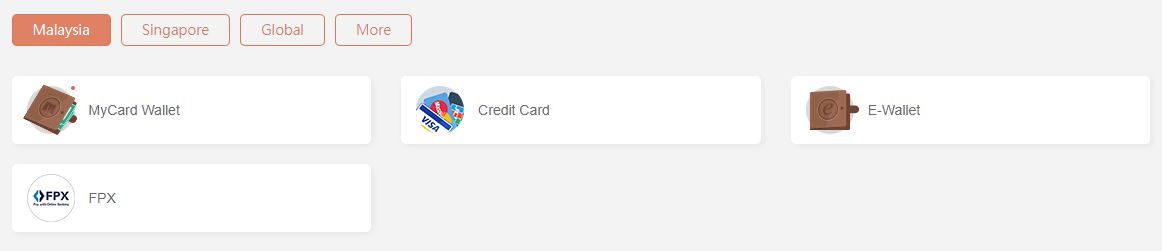
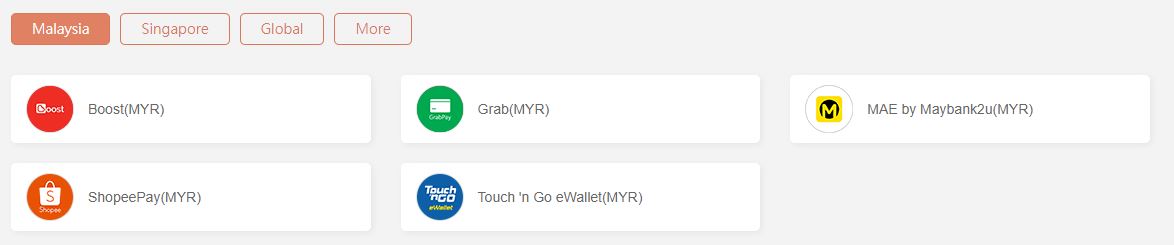
Malaysia Region (馬來西亞地區)
9.For Singaporean players, you may select [Singapore] region, and choose the payment method you prefer.
9. 新加坡用戶,地區選擇【新加坡】,及選擇您的付款方式.
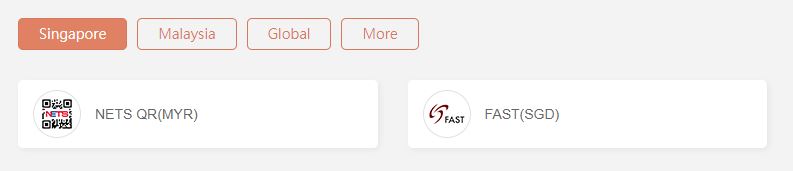


Singapore Region (新加坡地區)
II) In-Game Recharge (APK) 遊戲內儲值 (APK)
1. Please visit the website, download the APK:https://bit.ly/43UYjI5
1. 請前往網站,下載APK:https://bit.ly/43UYjI5
2. Download and Install APK.
2.下載並安裝APK.
2. Click the Diamond.
2. 點擊鑽石.

3. Select the payment method [Point Card] or [Member Point Deduction/Online Payment].
3. 選擇支付方式【點數卡】或【會員扣點/綫上購點】.

Pay by using [MyCard Point Card]
使用【MyCard點數卡】付款
5. Select [MyCard Point Card], fill in the card number (Serial Number) and password, click [Top Up].
5. 選擇【MyCard點數卡】, 輸入相應的MyCard卡號(Serial Number)和密碼(Password),點擊【進行儲值】即可.


Pay by using [Member Point Deduction/Online Payment]
使用【會員扣點/綫上購點】付款
6. Select [Member Point Deduction/Online Payment], and select which amount you intend to buy.
6. 選擇【會員扣點/綫上購點】和選擇欲購買的面額.


7. Select [MyCard Point Deduction], then login your MyCard member account to complete the payment.
7. 點選【MyCard會員扣點】付款,登入MyCard會員帳號即完成付款.

8. For Malaysian players, you may select [Malaysia] region, and choose the payment method you prefer.
8. 馬來西亞用戶,地區選擇【馬來西亞】,及選擇您的付款方式.


9.For Singaporean players, you may select [Singapore] region, and choose the payment method you prefer.
9. 新加坡用戶,地區選擇【新加坡】,及選擇您的付款方式.


Shall you having any issues regarding MyCard Top Up, reach us at our official Facebook page or WhatsApp and leave us a message! Our customer service will reach back for you as soon as possible.
FB Page:https://www.facebook.com/MyCardMalaysia
WhatsApp:https://bit.ly/MyCardCustomerService
若您在使用MyCard儲值上有任何疑問,請前往MyCard Malaysia粉絲頁或者Whatsapp詢問,客服人員會在工作時間內儘早回覆。
粉絲頁:https://www.facebook.com/MyCardMalaysia
WhatsApp:https://bit.ly/MyCardCustomerService
1. Please visit the website, download the APK:https://bit.ly/43UYjI5
1. 請前往網站,下載APK:https://bit.ly/43UYjI5
2. Download and Install APK.
2.下載並安裝APK.
2. Click the Diamond.
2. 點擊鑽石.

3. 選擇支付方式【點數卡】或【會員扣點/綫上購點】.

使用【MyCard點數卡】付款
5. Select [MyCard Point Card], fill in the card number (Serial Number) and password, click [Top Up].
5. 選擇【MyCard點數卡】, 輸入相應的MyCard卡號(Serial Number)和密碼(Password),點擊【進行儲值】即可.


使用【會員扣點/綫上購點】付款
6. Select [Member Point Deduction/Online Payment], and select which amount you intend to buy.
6. 選擇【會員扣點/綫上購點】和選擇欲購買的面額.


7. 點選【MyCard會員扣點】付款,登入MyCard會員帳號即完成付款.

8. 馬來西亞用戶,地區選擇【馬來西亞】,及選擇您的付款方式.


Malaysia Region (馬來西亞地區)
9.For Singaporean players, you may select [Singapore] region, and choose the payment method you prefer.
9. 新加坡用戶,地區選擇【新加坡】,及選擇您的付款方式.


Singapore Region (新加坡地區)
FB Page:https://www.facebook.com/MyCardMalaysia
WhatsApp:https://bit.ly/MyCardCustomerService
若您在使用MyCard儲值上有任何疑問,請前往MyCard Malaysia粉絲頁或者Whatsapp詢問,客服人員會在工作時間內儘早回覆。
粉絲頁:https://www.facebook.com/MyCardMalaysia
WhatsApp:https://bit.ly/MyCardCustomerService


