MyCard Malaysia 官方网站

MyCard Malaysia 官方网站 http://www.mycard.com.my
MyCard Malaysia FB https://www.facebook.com/MyCardMalaysia
顯示具有 English 標籤的文章。 顯示所有文章

2023年6月26日 星期一

T3 Arena MyCard Recharge Guidelines (T3 Arena MyCard儲值教學)

Android Download (Android載點):https://bit.ly/3r7kP2D
iOS Download (iOS載點):https://apple.co/44d6tvY
TapTap Download (TapTap載點):https://bit.ly/3JyotsW
Official Site (官方網站):https://t3arena.xd.com/
Facebook Page (官方粉絲團):https://www.facebook.com/PlayT3Arena

Official Recharge Website (官網儲值):
1. Visit the recharge website:https://pay-t3arena.starforce.tw/?lang=en_US
1. 首先前往儲值網站:https://pay-t3arena.starforce.tw/?lang=zh_TW

2. Key in your Character ID.
2. 輸入您的遊戲角色ID.


3. Select which【T-Gems】you intend to buy.
3. 選擇您欲購買的【T-Gems】.

4. Select【MyCard】as your payment method, and click【Submit Order】.
4. 選擇【MyCard】作爲您的儲值方式,及點擊【提交訂單】.


5. For Malaysian players, you may select【Malaysia】region, and choose the payment method you prefer.
5. 馬來西亞用戶,地區選擇【馬來西亞】,及選擇您的付款方式.

Malaysia Region (馬來西亞地區)

6. For Singaporean players, you may select【Singapore】region, and choose the payment method you prefer.
6. 新加坡用戶,地區選擇【新加坡】,及選擇您的付款方式.

Singapore Region (新加坡地區)

7. Pay by using【MyCard Point Card】, fill in the card number (Serial Number) and password, click【Top Up】.
7. 點選【點數卡儲值】付款,輸入相應的MyCard卡號(Serial Number)和密碼(Password),點擊【進行儲值】即可.

8. Pay by using 【MyCard Point Deduction】, then login your MyCard member account to complete the payment.
8. 點選【MyCard會員扣點】付款,登入MyCard會員帳號即完成付款.

9. Pay by using 【e-wallets】, and choose your favourite e-wallet to complete the payment.
9. 點選【電子錢包】,選擇您的電子錢包完成付款.

Malaysia Region (馬來西亞地區)


10. Pay by using 【Bank Transfer】, and choose your favourite bank to complete the payment.
10. 點選【銀行轉帳】,選擇您的銀行完成付款.
Singapore Region (新加坡地區)

Shall you having any issues regarding MyCard Top Up, reach us at our official Facebook page or WhatsApp and leave us a message! Our customer service will reach back for you as soon as possible.
FB Page:https://www.facebook.com/MyCardMalaysia
WhatsApp:https://bit.ly/MyCardCustomerService

若您在使用MyCard儲值上有任何疑問,請前往MyCard Malaysia粉絲頁或者Whatsapp詢問,客服人員會在工作時間內儘早回覆。
粉絲頁:https://www.facebook.com/MyCardMalaysia
WhatsApp:https://bit.ly/MyCardCustomerService


2023年3月23日 星期四

Soul of the Ultimate Nation Classic MyCard Recharge Guide


Download Game: https://sunclassic.webzen.com/en/support/download

Official Website: https://sunclassic.webzen.com/en

Recharge Website: https://pay.webzen.com/BuyWCoin

(1) Visit Webzen Website , click on [Top Up] button on the top of the website.


(2) Log In your Webzen account.


(3) Select the [Soul of the Ultimate Nation: Classic] and press continue.


(4) Select [MyCard] as your payment method.


(5) Select the item you wish to purchase. Lastly, click on [Continue] button.

Please select TWD for the currency (on the upper right corner).


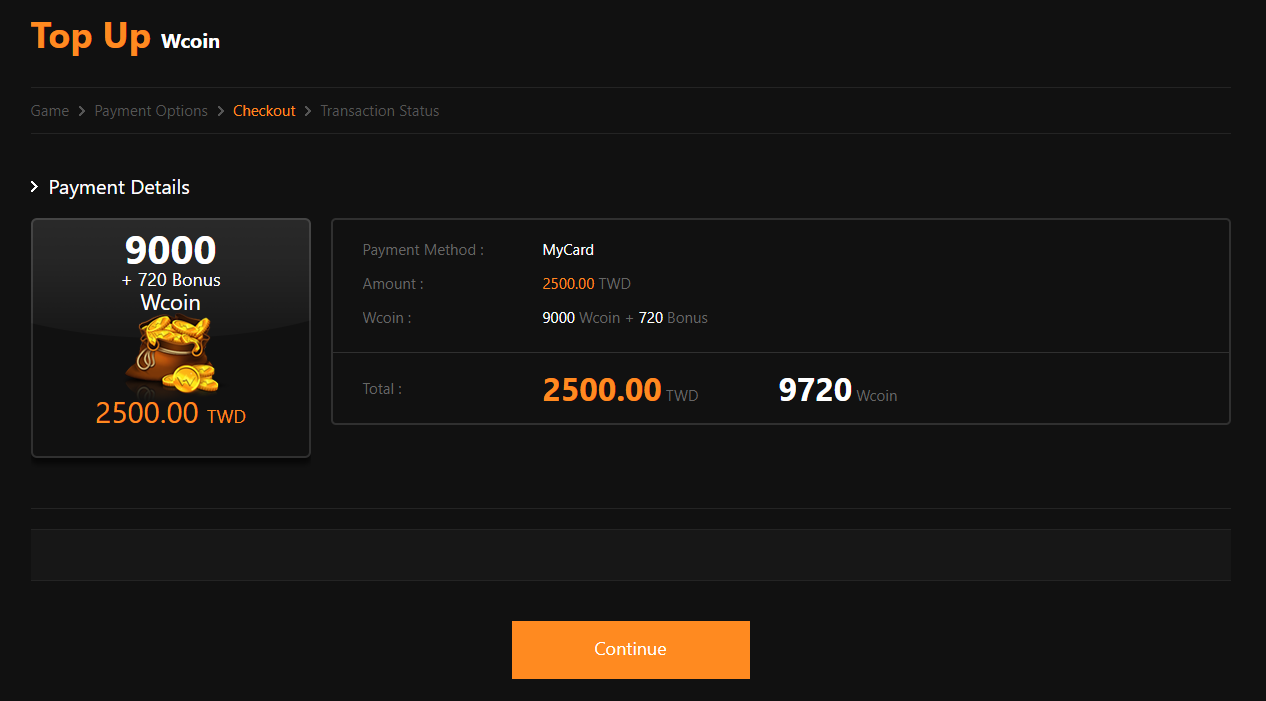
(6) Confirm the details of item you wish to purchase, then click [Continue] button.


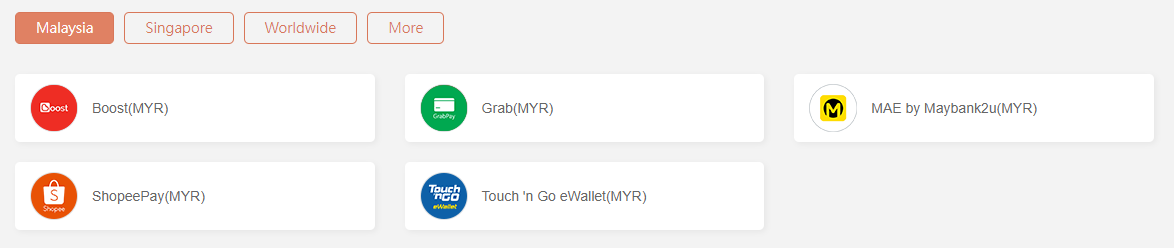
(7) For Malaysian players, you may select [Malaysia] region, and choose the payment method you prefer.


(8) Pay by using [MyCard Point Card], you may click on [MyCard Point Card], then fill in the card number and password.


(9) Pay by using [MyCard Point Deduction], you may click on [MyCard Wallet], then login your MyCard member account to complete the recharge.


(10) Pay by using [e-wallets], you may click on [E-Wallet] and choose your favourite e-wallet.


(11) For Singaporean players, you may select [Singapore] region, and choose the payment method you prefer.


Shall you having any issues regarding MyCard Top Up, reach us at our official Facebook page and leave us a message! Our customer service will reach back for you as soon as possible.

2020年4月3日 星期五

上古卷軸 傳奇 MyCard儲值教學(The Elder Scrolls Legends Reload Guide)


APK下載(APK Download):https://bit.ly/2R8DXIN
Android下載(Android Download):https://bit.ly/2X4RkO3
iOS下載(iOS Download):https://apple.co/3dN8S7r

1. Download the APK file and install it.
1. 安裝並下載APK包

2. Login to game and Press 【+】
2. 登入遊戲後點擊右上方皇冠幣旁的<+>

3. Select the Crown Coin that you intended to buy
3. 選擇欲購買的皇冠幣

4. Select 【MyCard點數卡】 as your payment method
4. 進入儲值管道頁面,選擇<MyCard點數卡>作為支付選項

5.Enter your MyCard Serial number and Password, then press the orange button 【送出】to complete.
5.輸入對應的MyCard卡號(Serial number)與密碼(Password),點擊<送出>即可

Shall you having any issues regarding MyCard Top Up, reach us at our official Facebook page and leave us a message! Our customer service will reach back for you as soon as possible:https://www.facebook.com/MyCardMalaysia

若您在使用MyCard儲值上有任何疑問,請前往MyCard Malaysia粉絲頁私訊詢問,客服人員會在工作時間內盡早回覆:https://www.facebook.com/MyCardMalaysia

2020年3月30日 星期一

Rockman X Dive MyCard儲值教學(MyCard Reload Guide)


APK下載(APK Download):https://bit.ly/2yjzvk1
Android下載(Android Download):https://bit.ly/39ttVsj
iOS下載(iOS Download):https://apple.co/33Ttma1
粉絲頁(Facebook Page):https://www.facebook.com/CAPCOM.RXD/

Official site top up:

2. Key in your【Game ID】, Select【Server】, and【Element Medal】that you intended to buy then press【送出】
2. 輸入<遊戲ID>,選擇<伺服器>,選擇欲購買的<元素礦晶>後點擊<送出>

Note: How to find your【Game ID】
注:如何查詢<遊戲ID>


3. Check your【details】and press【確定購買】
3. 確認<購買資料>後點擊<確定購買>

4. Select【MyCard點數卡】as your payment method
4.選擇<MyCard點數卡>作為儲值方式

5. Enter your MyCard Serial number and Password, then press the button 【進行儲值】 to complete.
5. 輸入對應的MyCard卡號(Serial Number)與MyCard密碼(Password)後,再點擊【進行儲值】即可

Shall you having any issues regarding MyCard Top Up, reach us at our official Facebook page and leave us a message! Our customer service will reach back for you as soon as possible:https://www.facebook.com/MyCardMalaysia

若您在使用MyCard儲值上有任何疑問,請前往MyCard Malaysia粉絲頁私訊詢問,客服人員會在工作時間內儘早回覆https://www.facebook.com/MyCardMalaysia