MyCard Malaysia 官方网站

MyCard Malaysia 官方网站 http://www.mycard.com.my
MyCard Malaysia FB https://www.facebook.com/MyCardMalaysia
顯示具有 reload guide 標籤的文章。 顯示所有文章

2022年4月4日 星期一

MyCard APP儲值教學(How to topup from MyCard APP)


APK Download(載點):https://bit.ly/3J5hVig
Android Download(載點)https://bit.ly/3NLbqVC
iOS Download(載點):https://apple.co/3uShMtt

1. Login to MyCard account
1. 登入MyCard帳號

There are 2 method to reload now
目前有2種儲值方式

【Top Up】(點數儲值)
1. Key in your MyCard Member Card serial number and password, then press【Confirm】
1. 輸入MyCard會員專屬卡的卡號與密碼後點擊【確認送出】

【Buy Online】(線上購點)
1. Choose the【MyCard Point】that you intended to buy
1. 選擇欲儲值的【MyCard會員點數

2. Choose E-Wallet
2. 選擇E-Wallet為付費方式

There are many different【payment methods】to reload MyCard member account
MyCard會員儲值擁有多種不同的【支付方式】

3. Select the【payment methods】that you intended to use
3. 選擇欲使用的【支付方式】

Shall you having any issues regarding MyCard Top Up, reach us at our official Facebook page or WhatsApp and leave us a message! Our customer service will reach back for you as soon as possible.

若您在使用MyCard儲值上有任何疑問,請前往MyCard Malaysia粉絲頁或者Whatsapp詢問,客服人員會在工作時間內儘早回覆。

2022年3月11日 星期五

奇蹟世界 MyCard儲值教學(SUN Classic MyCard Reload Guide)


1. Go to official website:https://sunclassic.webzen.com/en
1. 首先進入官方網頁:https://sunclassic.webzen.com/zh-tw

2. Press【TOP UP】
2. 點擊【TOP UP】

3. Login your account
3. 登入帳號

4. Select【SUN Classic】and press【Continue】
4. 選擇儲值遊戲為【奇蹟世界】然後點擊【Continue】

5. Select【MyCard】as payment method, then select【Amount】that you intended to purchase and press【Continue】
5. 選擇【MyCard】為支付方式,然後欲儲值的【Wcoin】後點擊【Continue】

6. Check payment details and press【Continue】
6. 確認訂單後點擊【Continue】

7. The current payment method options are:【Top Up】【MyCard Wallet】【Credit Card】【E-Wallet】【FPX】【Bank Transfer】
Malaysia user select【Malaysia】Singapore user select【Singapore】
7. 目前可選擇的儲值方式有【點數卡】【MyCard Wallet】【Credit Card】【E-Wallet】【FPX】【Bank Transfer】
馬來西亞玩家選擇【Malaysia】,新加坡玩家選擇【Singapore】


【Top Up】【點數卡】
1. Select【Top Up】and enter your MyCard Serial number and Password to complete.
1. 點擊【Top Up】然後輸入相應的MyCard卡號(Serial Number)和密碼( Password)即可

【MyCard Wallet】
1. Select【MyCard Wallet】and select【MyCard Wallet(TWD)】again, login your MyCard member account complete the payment.
1. 選擇【MyCard Wallet】後再次選擇【MyCard Wallet(TWD)】,隨後登入MyCard會員帳號即完成付費


【Credit Card】
1. Select and fill in your details to complete the payment.
1. 點擊後輸入資料再完成付費

【E-Wallet】
1. Select the E-Wallet method
1. 點擊後選擇想要使用的方式再完成付費

【FPX】
1. Select the bank to complete the payment.
1. 點擊後選擇想要使用的銀行再完成付費

【Bank Transfer】
1. Select【NETS QR】kto complete the payment.
1. 點擊後選擇【NETS QR】再完成付費

Shall you having any issues regarding MyCard Top Up, reach us at our official Facebook page or WhatsApp and leave us a message! Our customer service will reach back for you as soon as possible.

若您在使用MyCard儲值上有任何疑問,請前往MyCard Malaysia粉絲頁或者Whatsapp詢問,客服人員會在工作時間內儘早回覆。

2021年11月8日 星期一

Kingdoms Attack MyCard儲值教學(Kingdoms Attack MyCard Reload Guide)


APK載點(APK Download):https://bit.ly/3EYtzKn
Android載點(Android Download):https://bit.ly/3kfgbJV
iOS載點(iOS Download):https://apple.co/3CX21En
官網(Official Website):https://kingdoms.digginggames888.com/

1. Login to game and Press【Topup】
1. 登入遊戲後,點擊【Topup】

2. Select【Gold】that you intended to purchase
2. 選擇欲儲值的【元寶】

3. Select【台灣】and【MyCard】as payment method then press【Recharge】
3. 選擇【台灣】以及【MyCard】作為支付方式,然後點擊【Recharge】


4. 目前可選擇的儲值方式有【點卡】【金流】
【點數卡】
1. Select【Top Up】and enter your MyCard Serial number and Password to complete.
1. 點擊【Top Up】然後輸入相應的MyCard卡號(Serial Number)和密碼( Password)即可

【金流】
1. Malaysia user select【Malaysia Payment】
1. 馬來西亞玩家選擇【Malaysia Payment】

2. Select the payment method
2. 選擇想要使用的金流


3. Singapore user select【Singapore Payment】
3. 新加坡玩家選擇【Singapore Payment】

Shall you having any issues regarding MyCard Top Up, reach us at our official Facebook page or WhatsApp and leave us a message! Our customer service will reach back for you as soon as possible.

若您在使用MyCard儲值上有任何疑問,請前往MyCard Malaysia粉絲頁或者Whatsapp詢問,客服人員會在工作時間內儘早回覆。

2019年3月19日 星期二

Laplace M MyCard储值教学(Reload Guide)


APK下载(APK Download):http://bit.ly/2TK2Ca8
Android下载(Android Download):http://bit.ly/2Flkb7w
iOS下载(iOS Download):https://apple.co/2Y616xv
粉丝页(Facebook Pages):https://www.facebook.com/LaplaceMSEA/
官网(Official Website):http://laplacem.zlongame.com/

1. 进入官网后,点击【Top-up Center】
1. Go to official website and Press【Top-up Center】

2. 选择国家,然后选择【MyCard實體卡】为支付方式,
2. Select your country and Select【MyCard實體卡】as your payment method

3. 选择欲兑换的【商品】,输入【角色ID】点击【Confirm】,再次选择欲储值的【点数】,然后在空格处【打勾】点击【Top Up】
3. Select【Item】that you intended to buy, enter【Character ID】and press【Confirm】, Select【Item】again that you intended to top up, 【Tick】Top-up Agreement, and press【Top Up】

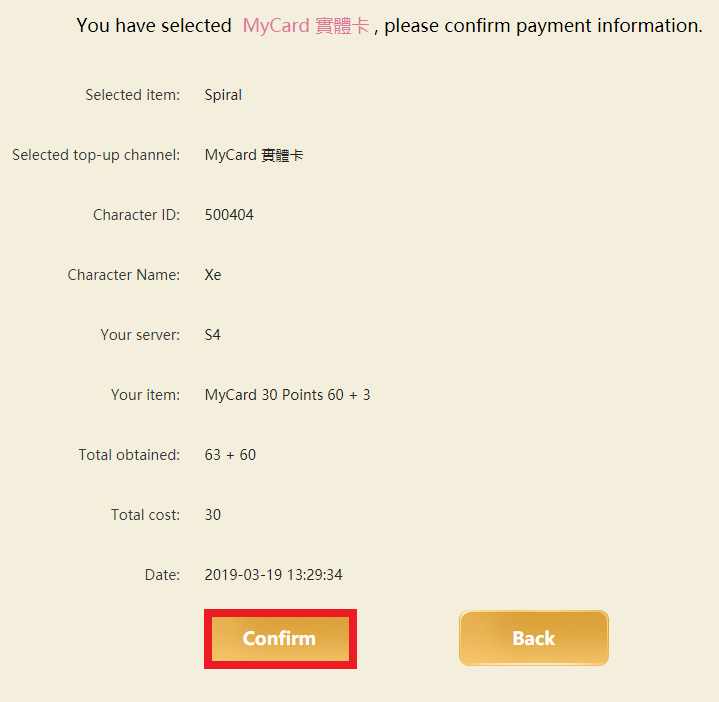
4. 检查【储值咨询】后点击【Confirm】
4. Check your【payment information】and press【Confirm】

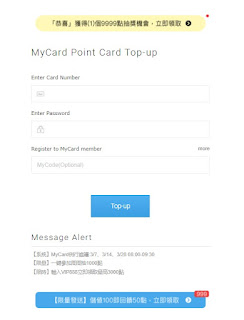
5. 输入对应MyCard卡号(Serial number)与MyCard密码(Password)后,再点击【進行儲值】即可
5. Enter your MyCard Serial number and Password, then press the button 【進行儲值】 to complete.

若您在使用MyCard储值上有任何疑问,请前往MyCard Malaysia粉丝页私讯询问,客服人员会在工作时间内尽早回覆:https://www.facebook.com/MyCardMalaysia

Shall you having any issues regarding MyCard Top Up, reach us at our official Facebook page and leave us a message! Our customer service will reach back for you as soon as possible:https://www.facebook.com/MyCardMalaysia

2019年1月8日 星期二

RO仙境传说 守护永恒的爱 MyCard储值教学 Ragnarok M Eternal Love MyCard Reload Guide


APK下载(APK Download):http://bit.ly/2H0JU8f
Android下载(Android Download):http://bit.ly/2LUtfBO
iOS下载(iOS Download):https://apple.co/2VD3V7O
官网(Official Website):https://ragnaroketernallove.com/

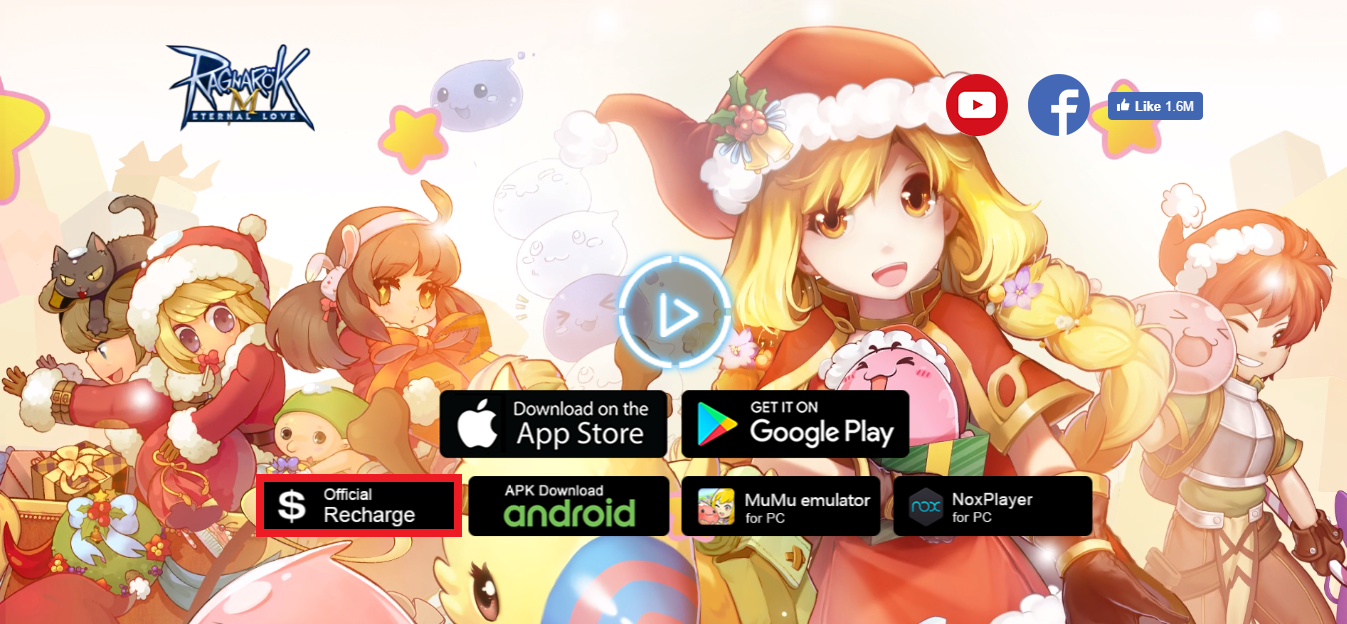
1. 进入官网后,点击【Official Recharge】
1. Go to official website and Press【Official Recharge】

2. 选择国家为【Malaysia】
2. Select your country as【Malaysia】

4. 选择【MyCard實體卡】为支付方式, 
4. Select【MyCard實體卡】as your payment method

5. 选择欲兑换的【商品】,输入【角色ID】,再次选择欲购买的【商品】,然后再空格处【打勾】点击【Recharge Now】
5. Select【in-game currency】that you intended to buy, enter【Character ID】, Select【Item】that you intended to buy, 【tick】AgreePayment Agreement, and press【Recharge Now】

5. 输入对应MyCard卡号(Serial number)与MyCard密码(Password)后,再点击【進行儲值】即可
5. Enter your MyCard Serial number and Password, then press the button 【進行儲值】 to complete.

若您在使用MyCard储值上有任何疑问,请前往MyCard Malaysia粉丝页私讯询问,客服人员会在工作时间内尽早回覆:https://www.facebook.com/MyCardMalaysia

Shall you having any issues regarding MyCard Top Up, reach us at our official Facebook page and leave us a message! Our customer service will reach back for you as soon as possible:https://www.facebook.com/MyCardMalaysia

2018年12月26日 星期三

烏托邦 起源(Utopia Origin)MyCard儲值教學(MyCard Reload Guide)


APK下載(APK Download):http://bit.ly/2CzMZru
Android下載(Android Download):http://bit.ly/2CzO82q
iOS下載(iOS Download):https://apple.co/2QSAKyQ
官網(Official Website):http://utopia.herogame.com/index_en.html

1. 登入遊戲後,點擊左上方的【菜單】再點擊【商店】
1. Press【Menu】and Select【Shop】

2. 點擊點卷旁的【+】
2. Press【+】

3. 選擇欲購買的【點擊】
3. Select【Credits】that you intended to reload

4. 選擇【MyCard】
4. Choose【MyCard】

5. 選擇【MyCard點數卡】為支付方式
5. Select【MyCard點數卡】as your payment method

6. 輸入對應MyCard卡號(Serial number)與MyCard密碼(Password)後,再點擊【進行儲值】即可
6. Enter your MyCard Serial number and Password, then press the button 【進行儲值】 to complete.

若您在使用MyCard儲值上有任何疑問,請前往MyCard Malaysia粉絲頁私訊詢問,客服人員會在工作時間內盡早回覆:https://www.facebook.com/MyCardMalaysia

Shall you having any issues regarding MyCard Top Up, reach us at our official Facebook page and leave us a message! Our customer service will reach back for you as soon as possible:https://www.facebook.com/MyCardMalaysia

2018年10月9日 星期二

第五人格(Identity V)MyCard儲值教學(MyCard Reload Guide)


Android下載(Android Download):http://bit.ly/2IJy27L
iOS下載(iOS Download):https://apple.co/2NwlSQi
粉絲頁(Facebook pages):https://www.facebook.com/IdentityVgame
官網(Official Website):https://www.identity-v.com/pc/index.html

1. 登入遊戲後,點擊【幻想大廳】
1. Press【Illusion Hall】

2. 點擊【取得回音】
2. Press【Get Echoes】

3. 選擇欲購買的【回音】
3. Select【Echo】that you intended to reload
注意:僅30點/90點/150點/300點/1490點可使用點數卡儲值,其餘需通過MyCard會員扣點
Note:Only 30, 90, 150, 300, and 1490 may use the point card, the rest need to deducted by MyCard Member

4. 選擇【MyCard點數卡】為支付方式
4. Select【MyCard點數卡】as your payment method

5. 選擇【一般卡】
5. Choose【一般卡】

6. 輸入對應MyCard卡號(Serial number)與MyCard密碼(Password)後,再點擊【送出】即可
6. Enter your MyCard Serial number and Password, then press the button 【送出】 to complete.

若您在使用MyCard儲值上有任何疑問,請前往MyCard Malaysia粉絲頁私訊詢問,客服人員會在工作時間內盡早回覆:https://www.facebook.com/MyCardMalaysia

Shall you having any issues regarding MyCard Top Up, reach us at our official Facebook page and leave us a message! Our customer service will reach back for you as soon as possible:https://www.facebook.com/MyCardMalaysia